When I first learned about Kenshi's save import system, I thought it was some kind of black magic. One minute, my save was a bloated mess with dead NPCs scattered across the world; the next, bam, a fresh, clean world with all my progress intact.
If your characters get stuck, your saves become corrupted, or you simply want to clean up the world, importing will become your best friend in Kenshi.
What Is Kenshi's Save Import System?
The import system is essentially New Game+ on steroids. It rebuilds the entire world from scratch while letting you choose exactly what to keep from your old save. Think of it as a selective reset button that gives you an incredible amount of control over your playthrough.
Importing is useful when the world glitches or you want to reset something.

When you press the import button, the game creates an entirely new world: all loot respawns, nests are cleared, ordinary NPCs return, and the world comes back to life. The clever part is that you decide what to bring over from your old save.
My main character got stuck inside a building's wall, classic Kenshi physics, and I was ready to quit for good. Then someone suggested importing with squad positions reset. The best gaming advice I have ever received.
You can also reset positions when loading normally. You do not need to import every time!
How Exactly Does Importing Work in Kenshi?
Here is what happens behind the scenes when you import:
- The game creates a new world using the current game rules.
- Your characters are extracted from the old save with all their stats, equipment, and inventories.
- Your chosen elements are carried over according to your settings.
- Everything else resets to the world's default conditions.
The process takes your squad and drops it into this fresh world. Your characters stay in the same positions unless you decide to play around with the squad position settings. We will get to that nightmare in a moment.
All those bandits you killed? They are back. 😈 All the loot you hauled away? Back on the shelves. Those ancient outposts you cleared for the fifth time? Yes, they have fresh loot again.
Every Import Game Setting Explained

Reset Squad Positions
This option literally saves lives. Checking it when importing teleports everyone just east of The Hub. Checking it during a normal load, rather than an import, moves everyone to wherever your camera was when you saved.


I use importing all the time to rescue stuck characters. Someone fell through the terrain? Reset positions. Want to move your entire faction quickly? Position the camera, save, and reset.
Import Buildings
Check this if you want to keep your bases and purchased houses. Uncheck it and everything you built disappears. Your impressive fortress or the shop you bought in The Hub will be gone, as though you had never been there.
I always keep this enabled unless I specifically want to abandon a base that has become too much of a headache.
Import Research
This one is non-negotiable for me. Leave this unchecked and all your technology resets to zero, apart from the starting tech. Even if you began with a faction that had plenty of blueprints unlocked, you lose it all.
Always import research. Nobody wants to learn how to craft crossbows for the twentieth time.
Import Dead NPCs
Here is where it gets interesting. This option determines whether UNIQUE NPCs stay dead or come back to life.
- Checked: the important people you killed stay dead, and world changes are preserved.
- Unchecked: everyone respawns, and major world events are rolled back.
I learned this the hard way when I unchecked it after finally taking down the Bugmaster. Guess who was back terrorizing the world on my next visit? Yes, that was a fun surprise.
Import Relations
This preserves your reputation with factions. Uncheck it and you are neutral with everyone again. Bounties do not reset, though. Strange, but fair enough.
Keep it enabled unless you want to wipe the slate clean after your diplomatic mistakes. Sometimes that helps when you have managed to anger absolutely everyone in the wasteland.
The Import Process, Step by Step
Here is how to import your Kenshi save properly:
- Return to the main menu. Never try to import from an active game.
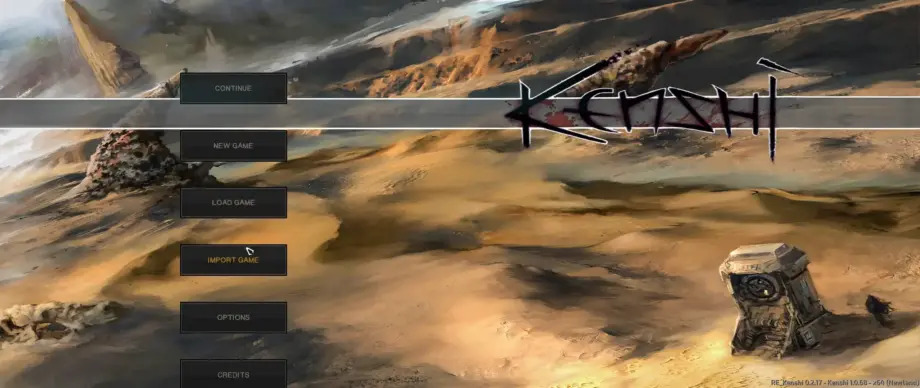
- Choose Import Game from the menu.
- Select the save file you want from the list.
- Check Import Buildings to keep your base.
- Check Import Research to preserve your technology.
- Check Import Dead NPCs if you want to preserve the world's current balance of power.
- Check Import Relations to keep your reputation intact.
- If someone is stuck, check Reset Squad Positions.
- Click Import and wait for the world to generate.
Tip: Always back up your save before importing, especially if you plan to experiment with the checkboxes.
When Should You Import?
Installing and Managing Mods
Most large mods require an import to work properly with existing saves. Whenever I add a large overhaul to an existing save, I import.
The game world needs to rebuild itself using the mod's new rules. Otherwise, expect bugs, conflicts, and all sorts of weirdness.
Fixing Bugs and FPS Problems
Kenshi saves become bloated over time; that is simply how the game works. Regular imports clear out accumulated junk and help the game run more smoothly. I import every couple of weeks of active play, and my saves last hundreds of hours without crashes.
Managing World States
Sometimes you do something stupid and regret it. Accidentally killed someone important? Want to bring back faction leaders you wiped out? The import system lets you selectively roll back world changes while preserving your characters' progress.
Quick Reference: Import Game Effects
| Import option | Checked | Unchecked |
| Your characters | Always imported | Always imported |
| Equipment and stats | Always imported | Always imported |
| Squad positions | Optional teleport | Remain unchanged |
| Buildings | Preserved | Removed/reset |
| Research | Preserved | Reset |
| Dead NPCs | Stay dead | Resurrected |
| Relations | Preserved | Reset to neutral |
| Bounties | Always preserved | Always preserved |
Important Things to Remember When Importing
- Prisoners in cages always disappear during an import, even with Import Dead NPCs checked. If you are holding important hostages, deal with them before importing.
- Items in backpacks stored inside containers may disappear. I lost plenty of valuable gear this way. Now I always empty backpacks into ordinary storage containers before importing.
- Some mods can cause problems with shops, buildings, or NPCs if their load order is wrong. Arrange your mod list carefully.
Importing a Character Versus Importing a Save
These are often confused, so let me clear things up:
- Importing appearance in the character editor simply copies a character's looks through .bod2 files. No stats or equipment, just their face and body.
- Fully transferring a character between different saves requires the Forgotten Construction Set (FCS) and manual file editing. It is complicated and not particularly useful for the average player.
Wrapping Up
The import system can seem confusing at first, but once you understand it, it becomes an essential tool in Kenshi.
Trust me, learn how to import and you will never have to abandon a well-developed character just because the game glitched or the world went off the rails.
Still Have Questions?
Is importing safe? Will it ruin my save?
It is completely safe. Importing creates a new save file and never touches the original. I have done it hundreds of times without corrupting anything. The worst that can happen is that you dislike the result, but make a manual backup anyway.
Will importing clear the bounties on my head?
No, bounties are attached to characters. Even if you reset faction relations, your criminal record stays with you. If the Holy Nation wants you dead, it still will, with rare exceptions, but bounties usually remain.
Can I transfer just one character to a different save?
Not through the normal import menu. You would need to use FCS and edit the files manually. A normal import transfers your entire faction. Most players simply create new characters in a new world.
What happens to research if I leave the box unchecked?
You lose everything apart from the most basic technologies. Even if you chose a wealthy trader start with plenty of things unlocked, declining to import research sends you back to sticks and stones. Always check Import Research unless you are looking for extra suffering.
Will ordinary NPCs respawn after importing?
Yes, ordinary NPCs always respawn. Import Dead NPCs only affects unique, named characters. Your favorite bartender returns, but the unique faction leader you beheaded might not, depending on your settings.
How often should I import?
Every week or two of active play, or whenever you install major mods. I import when a save starts slowing down or when I add new content. There are no strict rules, but regular cleanup keeps saves from breaking.