I still remember the first time I tried to mod Kenshi. I downloaded about fifteen mods from the Steam workshop, launched the game and nothing worked at all. Sound familiar?

Let me save you some time and frustration. After hundreds of hours tinkering with settings, and probably a couple of ruined saves, I worked out how to get mods running properly in this game. If you are wondering whether you can add mods mid-playthrough or why Kenshi mods do not appear in the launcher, this Kenshi modding guide covers both questions.
Installing Kenshi mods: three main options
Steam Workshop
Most people start here. It is the easiest method, when it feels like cooperating:
- Visit the Kenshi Workshop page on Steam.
- Click “Subscribe” to any mods that catch your eye, just don’t grab everything at once.
- Wait until Steam downloads everything, while you go get some coffee ☕.
- Launch the Kenshi launcher and go to the Mods tab.
- Enable your mods and launch the game.

My tip: Steam can be temperamental. If subscribed mods do not appear, try changing the download region in Steam settings. That helps in most cases.
How to install mods on Kenshi manually
This is where it gets interesting. If you bought Kenshi on Epic or want to install Kenshi mods without Steam, manual installation is your best option. Use this folder structure: Kenshi/mods/НазваниеМода/НазваниеМода.mod
This is crucial. Avoid nesting identically named folders like НазваниеМода/НазваниеМода/ азваниеМода.mod; I have made that mistake. The .mod file must sit directly inside a folder with the same name.

Step-by-step plan:
- Download the archive with the mod from Nexus or another site.
- Unpack it completely and keep an eye on the subfolders, they can be tricky.
- Find the very folder where the mod files are located.
- Copy it to your Kenshi\mods directory.
- Enable the mod in the game launcher.

Vortex Mod Manager
If you manage a mountain of mods, Vortex can be a lifesaver:

- Install Vortex Mod Manager from the Nexus Mods website.
- Add Kenshi to your list of games.
- Choose the mods you want to install.
- Use the Mod Manager Download buttons on Nexus Mods.
- Let Vortex sort out the file structure itself, it’s quite good at it.

Make sure your download folder is on the same drive as Kenshi.
Can you add Kenshi mods mid-playthrough?
Yes, but there are some caveats.
Long answer: You can add most mods to current saves, but it's always a risk. When you do this, you're essentially telling the game, “hey, remember all that data you saved? Forget it, everything is different now.”
Safe way to add mods
Use the Import Game function. This is a kind of world reset that:
- Keeps your characters and their stats.
- Preserves your bases and ownership of buildings.
- Maintains relations with factions and research.
- Recreates the world to fit data from new mods into it.
Most mods do not require an import unless they add or remove persistent elements of the world, such as new settlements or changes to town layouts.
My routine: back up the save → install the mod → use Import Game → cross my fingers → check everything carefully.
The following changes definitely require a save import:
Import is required:
- Any mods for changing the world map or landscape
- Mods that add new cities or settlements
- Mods to change the start of the game (ignore if you have already started)
- Global overhauls like Genesis or Universal Wasteland Expansion
- Mods for changing NPC spawns around the world
- Mods for editing factions, if they change faction territories
Can be installed without importing:
- Interface and graphics mods
- New armor and weapons
- New races, although you will need to choose them when creating a new character
- Animations and sounds
- Mods to improve AI
- Most price and stat balance mods
How do you know if import is needed? Read the description of the mod on the page in the workshop or Nexus. Authors usually write directly “requires import” or “safe to add mid-game”. If it’s not written, it’s better to play it safe and import.
What to do if mods are not displayed in the launcher
This drove me mad for weeks. Here is what usually fixes it:
File structure problems
The most common mistake. Your mod folder might look like this, and it's wrong: Kenshi\mods\CoolMod\CoolMod\CoolMod.mod
And it should look like this, this is correct: Kenshi\mods\CoolMod\CoolMod.mod
Steam download glitches
Sometimes Steam just… doesn't want to. Change your download region, restart Steam, sacrifice your keyboard to the modding gods. Usually it helps.
Cyrillic characters in the game path
Here's what's really annoying: if you have Windows in Russian and the path to the game looks something like this: C:\Пользователи\Иван\Documents\My Games\Kenshi
Some mods simply won’t see the files because of Russian letters. Steam usually installs games in C:\Program Files, but if you installed Kenshi somewhere in your documents, there may be problems.
How to fix:
- Move the installation to a path without Cyrillic characters, such as D:\Games\Kenshi
- Or change your Windows username to use Latin letters
- Or use only mods from the Steam Workshop, they usually do a better job of it
I once spent three hours troubleshooting before realizing Cyrillic characters in the path were responsible. Since then, I install all my games in a Games folder on a separate D:\ drive.
Manual installation and workshop conflicts
If you have both mods from Steam and those you installed manually, they sometimes conflict in the list. Mods may work fine, but simply not show up in the launcher as expected.
Kenshi mod load order
This is where modding gets complicated. With Kenshi mod load order , entries lower in the list override those above them. Think of them as layers of paint.
Kenshi Load Order Organizer Mod
Kenshi Load Order Organizer (K.L.O.O), by SalmonPunk, is a simple, clever utility that adds no gameplay content. It provides empty .mod files as visual dividers in the launcher, letting you organize your mods into logical categories.
It does not sort mods automatically; it gives you a framework for arranging them yourself.
It provides 11 categories. Place your mods under the appropriate heading:
- UI, Graphics, Performance – for the interface and textures.
- Animations – all combat and normal movements.
- New races and cosmetics – new characters, hair and beards.
- Game starts, NPCs, animals : starting scenarios and changes to creatures.
- Faction changes and bounty rewards —changes to factions and the reward system.
- Buildings – everything for building a base.
- Armor and weapons – new gear.
- Overhauls and world changes are huge mods that change the world.
- Patches : compatibility fixes.
- Economy – trade and price rebalance.
- Miscellaneous – everything else.
My recommended load order structure:
- Interface and Graphics (top).
- Animations.
- Character races and edits.
- Game starts and minor NPC changes.
- Faction edits.
- Buildings and world changes.
- Armor and Weapons.
- Global overhauls.
- Patches and Fixes.
- Economy (the very bottom).
Important: World-changing mods and overhauls should load early because they affect the most systems. Patches are loaded last so they can actually fix anything.
Manual editing of the mods.cfg file
Sometimes the launcher just isn't enough. If you want to get full control over the list, you can manually edit the mods.cfg file, which is located in the Kenshi/data/ folder.

Open it in Notepad++ or regular Notepad to see your list. You can:
- Change the order by simply copying and pasting lines.
- Add or remove mods without starting the game.
- Fix problems that the launcher can't handle.

Just don’t forget to make a backup of this file before you start poking around there. I myself have ruined my mod list more times than I care to admit.
Troubleshooting mod installation
Kenshi mods won't load at all
Before you panic and remove everything:
- Check the integrity of your files via Steam.
- Check your Kenshi mod load order, because conflicting mods can prevent each other from working.
- Enable mods one at a time to find the culprit causing the problems.
Game crashes with mods
I've been through this. Here's what usually helps:
- Install Kenshi CTD Fix Patch, seriously, just do it.
- Avoid running the game at high speed constantly; it is a quick route to crashes.
- Use the RE_Kenshi mod for automatic saves during crashes.
- Don't run too many world-changing mods at once.
Performance issues
The modded Kenshi consumes resources like crazy, but there are specific fixes for different cases.
Texture optimization:
- The Compressed Textures Project mod reduces loading time by almost half and saves a lot of memory.
- Compression hardly spoils the picture; to be honest, I don’t see any difference at all.
- This is especially useful if you install several graphic mods.
Graphics card tips:
- Nvidia: see SCAR’s optimization guide for useful shadow and particle adjustments.
- For AMD: just use performance mods from my list.
Advanced crash protection: besides the basic fix, here’s what works:
- Never press Alt-Tab on loading screens, for some reason it kills your saves.
- Disable Windows Game Mode if you experience random freezes.
- Run Kenshi as administrator, strange permissions issues can cause crashes.
- Reduce the squad size limit, if you have mods for recruiting 30 or more characters, this is often the reason for Kenshi’s instability.
Steam Launch Options
Sometimes the problem is not the mods, but the way the game itself runs. Steam launch options can solve a lot of headaches:
How to add launch options:
- Right click on Kenshi in the Steam library
- Properties → General tab
- Enter the required commands into the “Launch Options” field
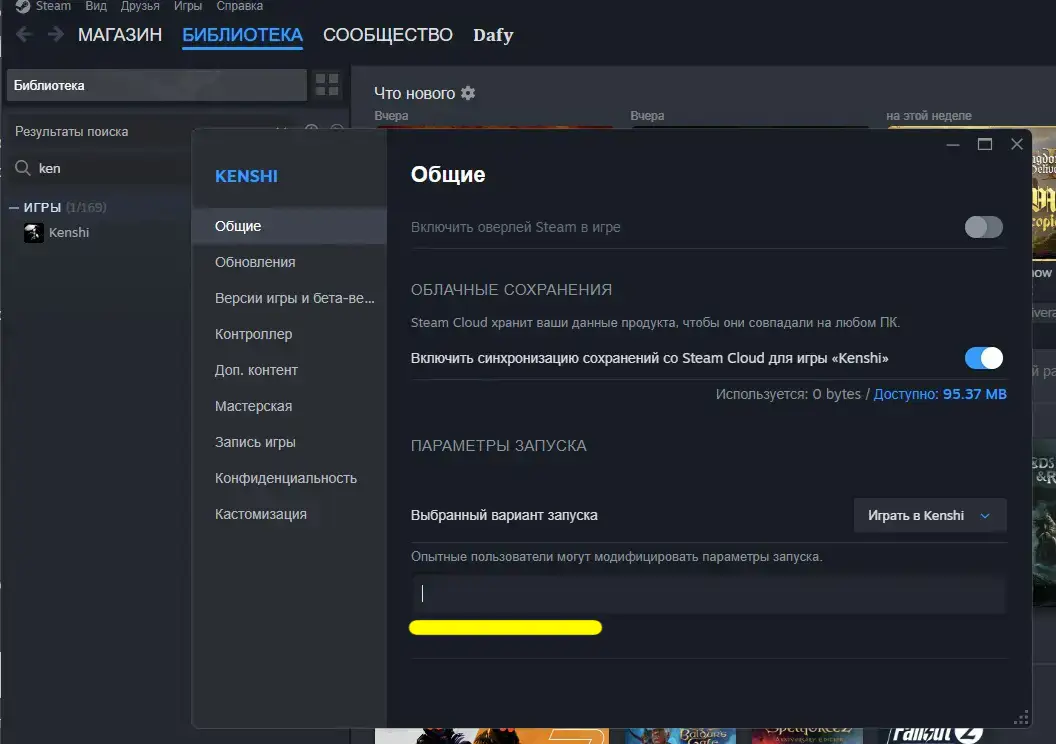
This is what your line might look like -threads:6 -skipintro -noworkshop
Useful parameters:
-skipintro skips all startup screens, saves time
-noworkshop the game will not check mods from the workshop at startup, helps if Steam is buggy with subscriptions
-threads:X where X is the number of processor cores, may improve performance (for example -threads:4)
-lowmemory mode for weak PCs with little RAM, reduces texture quality
Advice from someone who broke the game twice
- Always make a backup of the mods.cfg file before making any major changes.
- Use FCS (Forgotten Construction Set) to check dependencies and conflicts.
- Start small, don't install 50 mods at a time, like I once did.
- Read the descriptions of the mods, some of them directly require a new game.
- Test on a new save first, before adding a mod to a character you have spent 100 hours roleplaying.
Where are saves stored and how to back them up correctly?
Kenshi stores saves here: C:\Users\ИмяПользователя\AppData\Local\Kenshi\save
AppData is a hidden folder, so turn on show hidden files in Windows Explorer.
My backup method:
- Before installing new mods, I copy the entire save folder somewhere to the desktop
- I name the copy by date like Kenshi_Backup_18_01_2026
- If something goes wrong, restore the copied folder.
Ready to install Kenshi mods and avoid the usual problems
Modding Kenshi takes more than pressing one button. When Kenshi mods do not work or fail to appear, the usual culprits are incorrect folder structure, load-order problems, or Steam having a bad day.
Take your time, back up everything and don’t be afraid to experiment. Kenshi's modding community is incredible, and once you get the hang of it, you'll wonder how you ever played vanilla.
Go forth and mod responsibly. 😊
Answers to frequently asked questions
My game crashes every 5-10 minutes with mods, what's wrong?
Turn off half of your mods and check. If it works, then there are problematic mods in the second half. Keep splitting the list in half until you find the culprit. Usually this is either a conflict, or you launched too many heavy script mods at once.
Is it possible to use mods from different sources such as Steam, Nexus and install them manually?
Yes, but it will be a mess. The game will handle this, but managing load order will become a nightmare. If possible, choose one source or use Vortex for the entire list.
Do I need to disable mods before deleting them?
Always. Removing active mods without first disabling them may ruin your saves. First, turn it off in the launcher, check that the save loads normally, and only then delete the files.
What is the difference between “Import game” and “Continue”?
Importing resets the world while preserving your progress, and you need it after adding or removing mods. Continue simply loads your latest save as it stands for normal play.
Why does my FPS drop when I enter cities?
You probably have graphics improvements without optimization mods. Start with compressed textures and a shadow fix, then add visual upgrades.
Are there mods that are guaranteed to cause crashes?
These are usually heavy conversion mods. Don't try to run multiple faction modification mods at the same time, and be careful with mods that spawn too many NPCs in the world.
My mods from the workshop are not downloading, what should I do?
Change the download region in the Steam settings to something nearby and restart the client. This cures about 80% of such workshop problems.
How can I start making mods for Kenshi myself?
You already have the main tool: Forgotten Construction Set (FCS). It is in the game folder and is the same editor the developers used. You do not need coding skills; it is closer to editing a database. Start with these FCS guides on Steam.