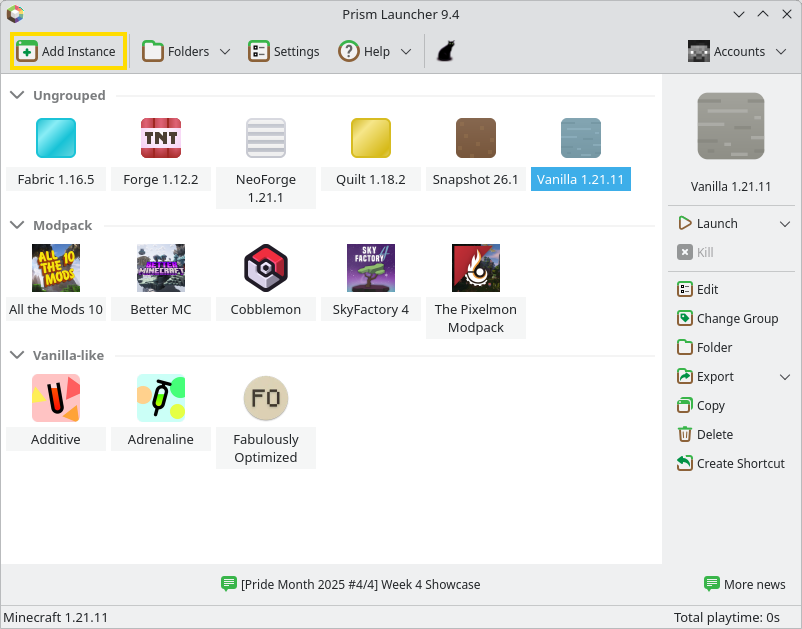
To install a Minecraft Java modpack on Windows, find it in your launcher’s catalog or import the file you downloaded. Use CurseForge for a CurseForge .zip, Modrinth App for an .mrpack, or Prism Launcher for either format. If you’re still deciding what to play, browse all Minecraft mods and modpacks on Dafy Gaming Hub.
Which launcher and modpack file should you use?
You’ll need an internet connection to download the files, free disk space, and a Microsoft account with access to Minecraft: Java Edition. Check three things on the modpack page: the modpack release, the Minecraft version, and the mod loader, such as Forge, Fabric, or NeoForge. The launcher uses your selected release to set up the right game version and loader. If you’re joining friends on a server, ask them which modpack release they’re using.
To install a specific release in CurseForge or Modrinth App, open the pack’s page, go to Versions, and click the download icon next to the release you want. If you want the archive itself, look for that release under Files on the CurseForge website or Versions on Modrinth. Open the release page and click Download.
- CurseForge ZIP (.zip). This is usually an exported profile with manifest.json at the root of the archive. The launcher reads the manifest and downloads the specified versions of each mod. A download labeled Server Pack is for running a server. Get the main client file to play.
- Modrinth (.mrpack). This archive uses its own modrinth.index.json file. The index lists what to download and which loader to use. Give the launcher the .mrpack file as downloaded, with its original extension.
If the ZIP contains a mods folder and has no import manifest, follow the author’s manual installation instructions. To import a pack, select the CurseForge ZIP or .mrpack without extracting it. If the modpack is in your launcher’s catalog, you can install it directly from there.
How to install a modpack with CurseForge
- Install the CurseForge app and open Minecraft. The first time you open this section, the app asks you to set up a folder for Minecraft and its mods.
- Go to Browse and select Modpacks from the project type menu.
- Find your pack, click Install, and wait for it to finish.
- Open My Modpacks and click Play on the pack’s card. If Minecraft Launcher opens, sign in to your Microsoft account if prompted, then click Play with the modpack profile selected.
How to import a ZIP file
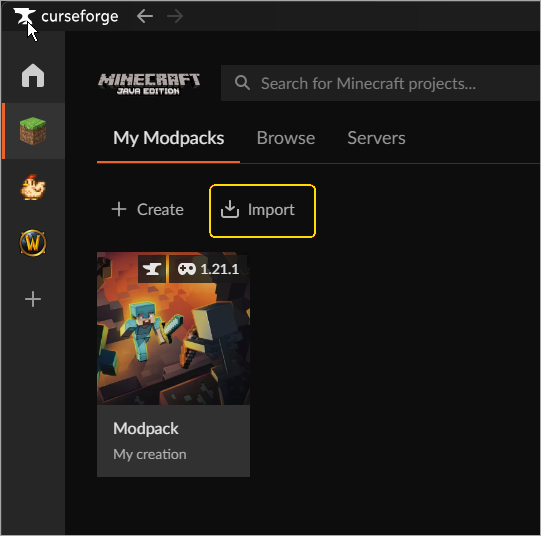
Step 1. In the Minecraft section, open My Modpacks and click Import. You can use this option to install a profile a friend exported from CurseForge, for example.
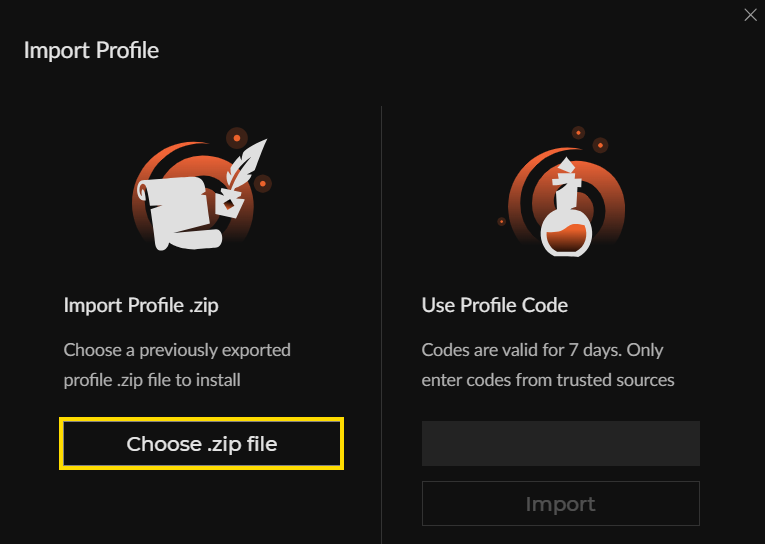
Step 2. Click Choose .zip file, select the modpack archive, and wait for the installation to finish.
Step 3. Find the new profile in My Modpacks and click Play.
How to install a modpack with Modrinth App
- Install Modrinth App and sign in with the Microsoft account you use to play Minecraft: Java Edition.
- Open Discover from the left sidebar, select Modpacks, and search for the modpack by name.
- Click Install and wait for the installation to finish.
- Go to the Play page, find the profile in the Library section, and launch it.
How to import an MRPACK file
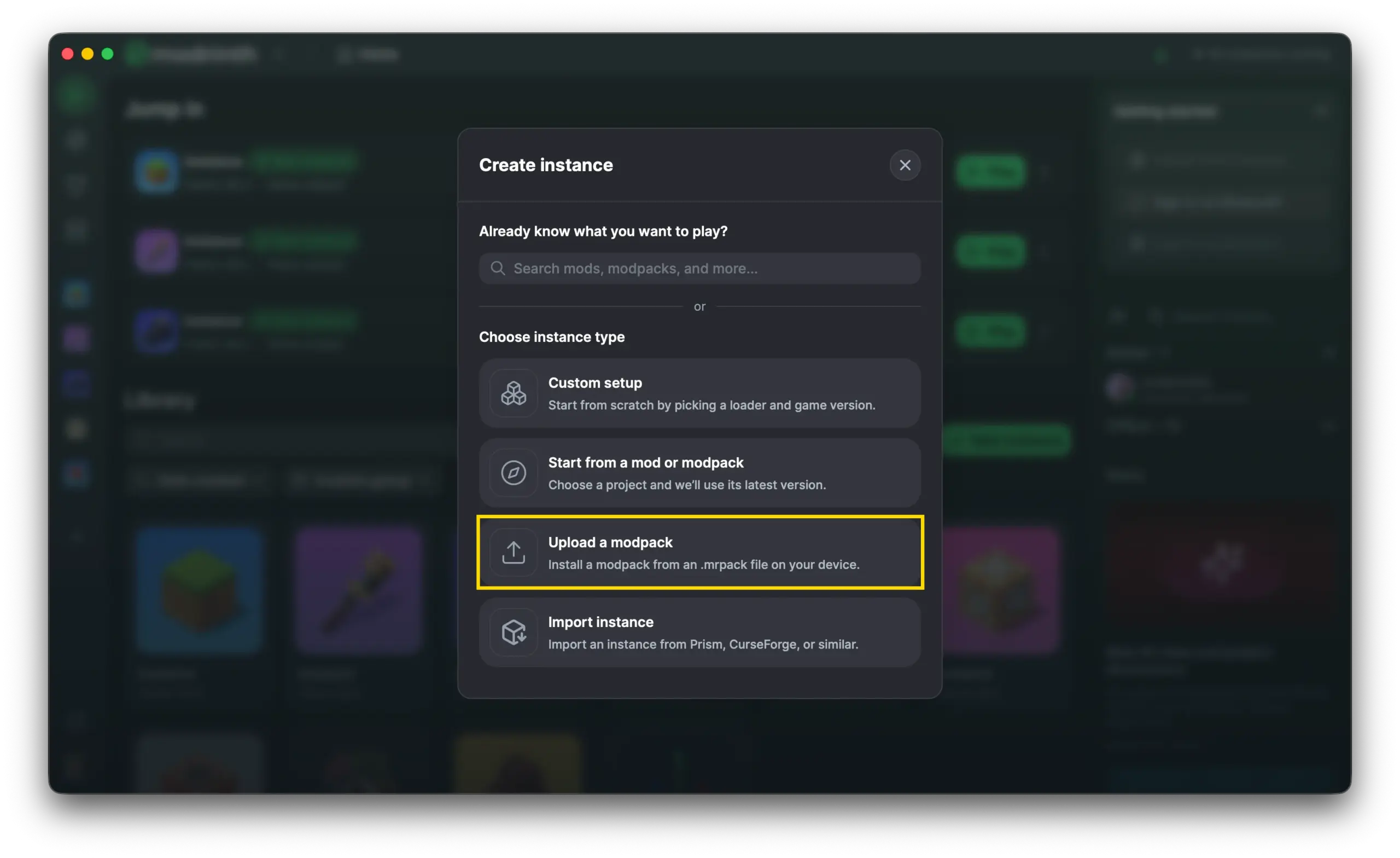
Step 1. Go to the Play page and open the Create instance menu.
Step 2. Select Upload a modpack and open the downloaded .mrpack file.
Step 3. Wait for the installation to finish, then launch the new profile from Library on the Play page.
How to install a modpack with Prism Launcher
Step 1. Install Prism Launcher for Windows and add your Microsoft account.
Step 2. Click Add Instance and select CurseForge or Modrinth on the left.
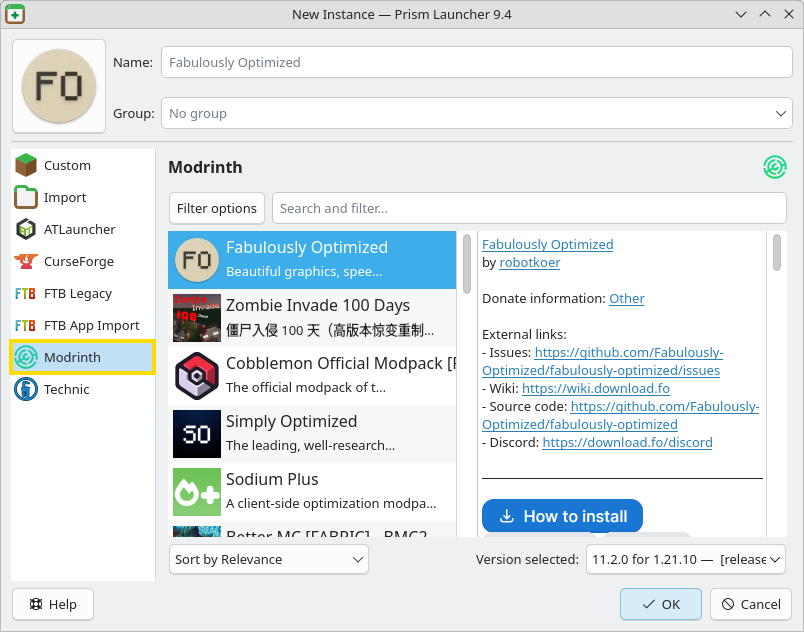
Step 3. Find the modpack, choose a release, and click OK.
Step 4. If Prism asks you to download individual mods through your browser, open the links it provides and follow its prompts. After installation, select the pack in the main window and click Launch.
How to import a ZIP or MRPACK file
Step 1. Click Add Instance and open the Import tab.
Step 2. Click Browse, select a compatible .zip or .mrpack, and click OK.
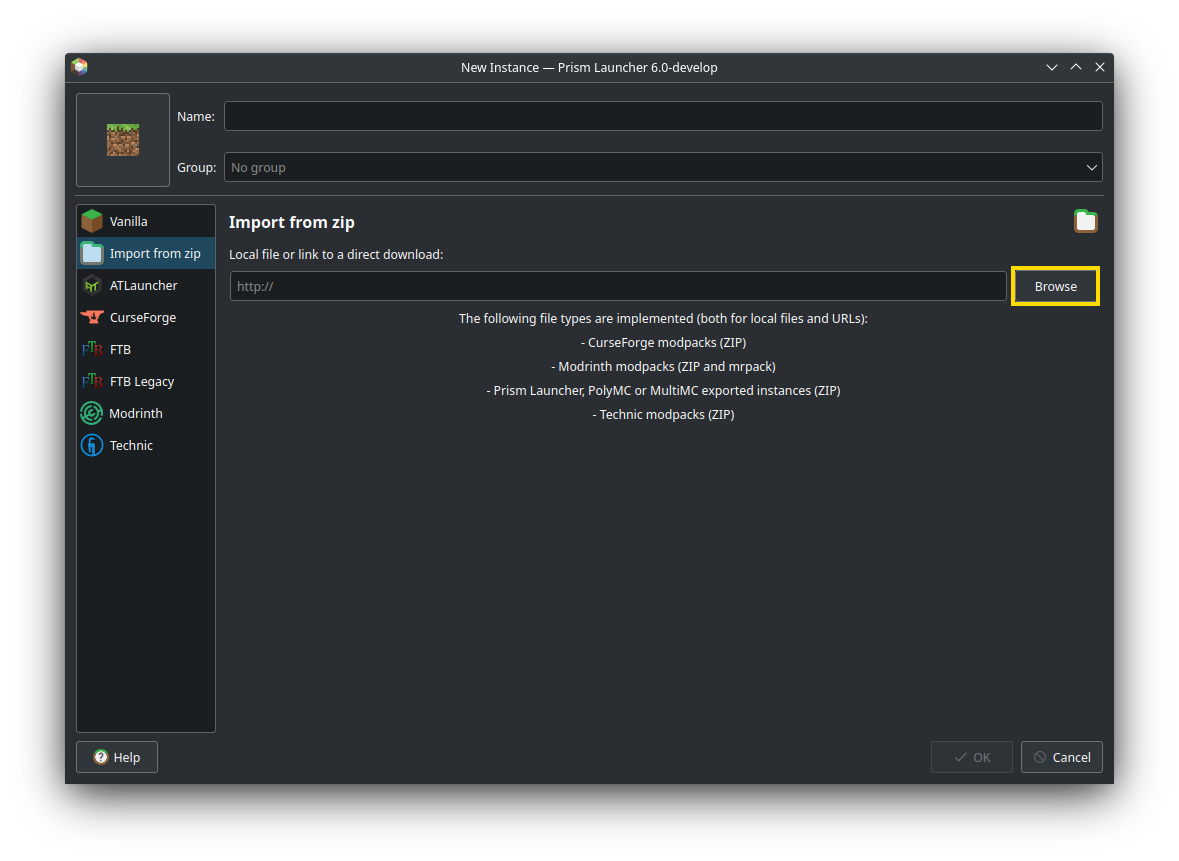
Step 3. Wait for the installation to finish. Select the new instance in the main window and click Launch.
What to check on the first launch
Once you reach the main menu, create a test world and try one of the features listed on the modpack page. You might open the quest book, look up a new recipe, or check the map. If the feature is missing, make sure you launched the modpack’s profile.
If the game runs slowly, reduce the render distance and try turning off shaders if the pack uses them.
Minecraft modpack installation FAQ
What's the difference between Forge and CurseForge, and how do I install a single mod?
Forge loads mods built for Forge. CurseForge helps you find a mod and install it in the right profile. Check the mod’s page for its supported Minecraft version and mod loader. In the CurseForge app, open the mod’s listing and click Install, select a compatible profile or create one, check the mod page for required dependencies, and add any missing ones to the same profile before launching it. CurseForge’s mod installation guide
Why does the launcher reject my ZIP or MRPACK file?
If you see Invalid file, check that you downloaded the client file from the correct release page. CurseForge expects a ZIP with manifest.json at the root, while Modrinth App imports an .mrpack with modrinth.index.json. In Prism, select a compatible export. If you got a Server Pack, a plain ZIP full of mods, or an incomplete download, download the complete client archive and import it as is.
What if installation gets stuck while downloading a mod?
Write down the file name and error message, then check your connection and free space on both the system and game drives. For Failed to download file in CurseForge, open the three-dot menu in the top right of the Minecraft section and select Repair Installation. If Prism offers a manual download, get the required file through the launcher’s link. If that mod release is unavailable, check whether the pack author has published a fix. A different mod version may be incompatible with the rest of the pack.
Why does the launcher show Play Demo or refuse to sign me in?
Sign out and sign back in to the Microsoft account with access to Minecraft: Java Edition. Check that you can play the full game with the same account in the official Minecraft Launcher. Modrinth App keeps Minecraft and Modrinth sign-ins separate. Use the Steve icon to add your Minecraft account.
Which Java version does my modpack need?
Check the Minecraft version in the profile. Minecraft 1.20.1 can run on Java 17, 1.20.5 requires Java 21, and 26.1 requires Java 25. In Prism, right-click the instance and open Edit → Settings → Java. Its settings can override the global settings. For automatic setup, open Settings → Java from the top toolbar and enable Autodetect Java version and Auto-download Mojang Java if available.
What should I check if I see OutOfMemoryError: Java heap space?
Compare the profile’s memory limit with the pack author’s recommendation. Look in Profile Options in CurseForge, under Java and memory in Modrinth App, or under Memory in Prism’s Java settings. If your PC has RAM to spare, raise the limit to the recommended amount and try again. Leave memory for Windows and background apps. If you’re already short on RAM, try a lighter pack.
How do I find the cause of a crash with Exit Code: 1?
The exit code alone doesn’t identify the cause. In CurseForge, right-click the modpack’s card and choose Open Folder, then open logs/latest.log. In Modrinth App, open the modpack’s profile and go to Logs. In Prism, right-click the instance, choose Edit → Other logs, and select logs/latest.log from the drop-down list.
If the pack folder contains a report under crash-reports, check the most recent file. A missing dependency error may name the required mod and version. If you contact the pack author, include the error message and the versions of the pack, Minecraft, and the mod loader. Remove personal information and tokens before sharing logs.
Why can't I join a modded server?
If you see mismatched mod channel list or Failed to synchronize registry data, ask the server admin for the exact modpack release. Launch that release from a separate profile. If the server uses a custom set of mods, check the Minecraft version, the loader type and version, and the versions of all mods the server requires on the client. If a mod is required on both sides, install it on your PC and ask the server admin which version the server uses. Aternos’s guide to installing mods on the server and client
How can I update a modpack and still roll back?
Read the release notes and back up your world. Install the new modpack release in a separate profile. In CurseForge, open the pack’s card under My Modpacks and click the arrows next to Play. Pick the release, check Update to a separate modpack profile, and click Continue.
Test the new release on a copy of your world. The next answer shows how to move that copy into the new profile. If the update doesn’t work out, you can return to the old profile and keep playing from your original save.
Can you open an old world with a new modpack?
Yes, if the pack supports the Minecraft version your world was last saved in and is designed to work with existing saves. Even when the versions match, new biomes and structures may only appear in unexplored areas, and a pack with custom world generation may require a new world.
Close Minecraft and back up your world. Then copy the world’s folder from the old profile into saves in the new profile and open only that copy in the modpack. After saving with the new mods, some blocks or items may disappear if you reopen that copy with the old set of mods.