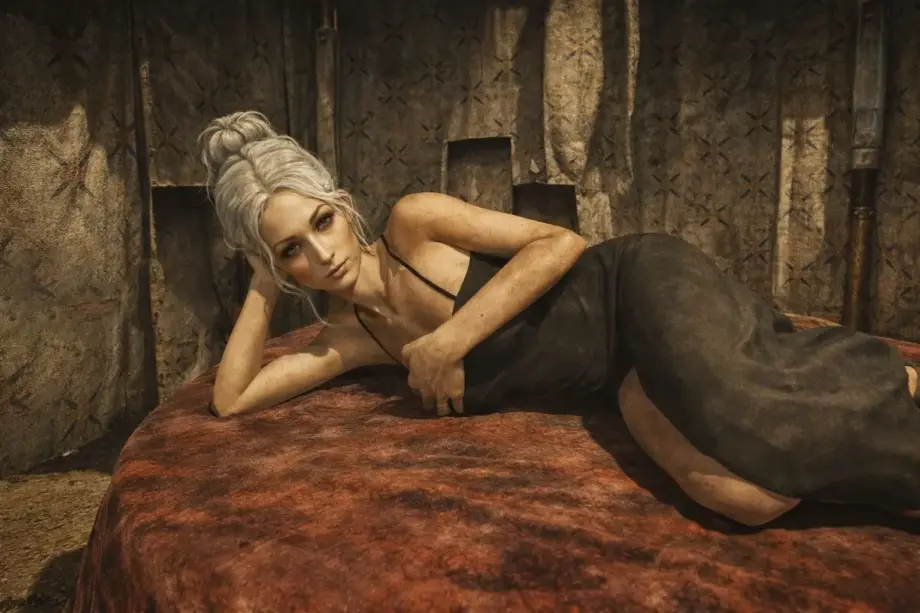
Fallout: New Vegas appearance mods turn the unmodded classic's cardboard faces and wooden animation into something you can look at without wincing. Vanilla NPCs look as though someone sculpted them from modeling clay in 2010 and forgot to finish: identical faces, neck seams, and five-polygon hairstyles.
This article brings together mods that improve hundreds of faces, add proper seamless bodies, realistic skin with subsurface scattering, and hundreds of new hairstyles.
Scripted New Vegas Redesigned 2
This mod reworks hundreds of NPC faces through scripts: no vanilla record edits and almost perfect compatibility. Faces become human and varied while staying close to Obsidian's original aesthetic. No anime waifus, just believable Mojave inhabitants with wrinkles and scars.

- Implemented through BaseCopyFaceGenFrom scripting with no performance overhead.
- Changes are not stored in saves: the script runs once at startup.
- FaceGen with the green tint fixed.
- MCM settings let you remove Boone's gray beard or restore Veronica's hood.
- Body-mod patches available.
✅ How gameplay changes: You stop seeing clones and mutants in every town. NPC faces look as though an artist designed them rather than a random number generator. Everyone has individual features, and age reads naturally instead of “everyone is either 40 or 60.” Scripts run in the background without slowdowns, so FPS is unaffected.
Character Expansions Revised
A lightweight version of Machienzo's legendary NVCE, reworking over 2,000 NPC faces across all DLC. The developers removed the extras and focused on performance: exported face textures improve FPS, while the visuals stay as close as possible to the classic game, only more human and varied.

- Over 2,000 edited NPC records across the base game and all DLC.
- Exported face textures instead of dynamic generation, for better FPS.
- An Extras file adds generic NPCs to leveled lists.
- YUP patch included.
- No gameplay, stat, or dialogue edits.
✅ How gameplay changes: NPCs stop looking like wax mannequins in a horror museum. Faces gain proper proportions: not everyone has a square jaw and sunken eyes anymore. Especially noticeable in Dead Money and Old World Blues, whose vanilla faces looked particularly lifeless. Exported textures improve performance because the engine no longer generates faces on the fly.
TYPE4 — Body and Armors
A full female body replacement with improved hands and upper torso and no neck seams whatsoever. The main problem with body mods is finally solved. Includes all armor and clothing refitted to the new body mesh for more accurate animations.

- A seamless connection between head and body, at last.
- Improved hand and upper-body meshes.
- Full armor and clothing support for the base game and all DLC.
- Additional options on the download page.
✅ How gameplay changes: No more ugly neck seams visible in every conversation and cutscene. Armor fits naturally without gaps or protruding polygons. Particularly noticeable with light clothing such as Merc Outfits or Wasteland Wanderer outfits: arms and shoulders look human rather than like GTA: San Andreas NPCs.
Zzjay’s body and face textures workshop — Type 3 — 4 and 6
A comprehensive HD body and face texture overhaul for Type 3, 4, and 6 body replacers. Covers standard characters as well as ghouls, raiders, tribals, and specific DLC NPCs such as lobotomites.

- Highly detailed body and face skin textures, with NSFW options.
- Support for Type 3, Type 4, and Type 6 bodies.
- Extensions for ghouls, raiders, lobotomites, and others.
- Compatibility with Improved Vanilla Body.
- Separate textures for FO3 female characters and Old World Blues.
✅ How gameplay changes: Skin gets proper detail: visible pores, scars, and surface irregularities. Ghouls stop looking like green mannequins, and raiders gain dirt and battle scars. The difference is particularly clear in close-up dialogue: instead of blurry vanilla textures, you see realistic skin with fine surface detail.
Vanilla Plus Skin
An xNVSE plugin and shader replacer adding preintegrated subsurface scattering, a technique used in modern games such as Ghost of Tsushima. Removes the unnatural glow around faces and bodies, making skin softer and slightly translucent along curves.

- Realistic subsurface scattering: skin no longer shines like plastic.
- Renders a preintegrated skin LUT at game startup and calculates curvature on the fly.
- Works with Character Kit Remake, TYPE4, and any face mods.
- Requires xNVSE; load after LOD Flicker Fix – NVSE.
- No performance impact after the initial calculation.
✅ How gameplay changes: Light starts behaving properly: cheeks, ears, and fingers gain the natural translucency of living skin. The default glossy lighting disappears, and faces look organic even in bright light. Especially effective indoors, where skin no longer resembles a rubber mask.
Simple Dynamic Hair (ESP-Less)
A lightweight ESP-free framework that dynamically changes the player's hairstyle depending on equipped armor, with up to four options in the runtime version. Loose hair beneath a helmet automatically becomes a ponytail or tighter style to prevent clipping through the model.

- Four configurable styles: loose, fuller loose hair, high ponytail, and close-fitting hair.
- On-the-fly switching through OnEquip events.
- ESP-less: unaffected by load order.
- Requires xNVSE + JIP PP LN (or JIP LN) + VPP+ + Hair Patcher Two.
- INI configuration for hairstyle and armor lists.
✅ How gameplay changes: Forget hair sticking through helmets and hoods: the system selects a suitable style for your equipment. Put on power armor and your hair automatically tightens into a bun; remove it and loose hair returns. You must configure the INI manually, but it works perfectly after setup. Be patient and spend a few minutes adjusting it.
Megaton Hairs — Vegas Edition
A remake of classic hairstyles by Nouk, Apachii, and partly KS Hairdos for New Vegas, with 107 detailed female hairstyles. Adds a huge range of lengths, styles, and volumes, plus automatic adjustment through EGM files to prevent clipping when head shapes change.

- 107 hairstyles for vanilla female races.
- A master file, zzjayHairsFNV.esp, plus a separate ESP for standard bodies and characters.
- EGM files for compatibility with head edits.
- Clean file structure without clutter.
✅ How gameplay changes: Choosing a hairstyle during character creation stops being a joke. Instead of five vanilla options, you get a hundred styles, from short pixie cuts to long braids. Mesh quality is high, and textures are sharp. Especially useful for female Couriers: you can create a distinctive role-playing look.
Beauty Pack PLUS — Project Mikoto — Hair — Eyes — Presets
A classic beauty pack with one of FNV modding's largest hair collections. Adds 151 female and 70 male hairstyles, plus 131 eye textures, including glowing options, and working eyelashes.

- 151 female and 70 male hairstyles.
- 131 eye textures plus 25 glowing variants.
- Working eyelashes included.
- Replaces race files: use only one race-altering mod at a time.
- Old, from 2011, but still relevant.
✅ How gameplay changes: A huge choice of hair and eyes gives you almost unlimited customization. The mod is old, but its textures and meshes still hold up well.
Simple Hairs — New Vegas
A clean, modern pack with 20 female hairstyles and headgear-compatible variants for helmets and hoods. Realistic styles without unnecessary extras.

- 20 new female hairstyles plus helmet variants.
- Simple, realistic styles suited to the wasteland.
- Requires NVSE 6.1.0+ and JIP LN NVSE.
- Optional color-replacer ESP.
✅ How gameplay changes: Hairstyles fit the Mojave: practical short cuts, braids, and buns rather than glamorous salon styling. Variants automatically address helmet clipping: put on a hat, and the hair adjusts.
Sin City Male Skyhair Pack
The largest pack for male characters in New Vegas: 71 new male hairstyles converted and optimized specifically for the engine. Ranges from realistic drifter styles to more fashionable options, with clipping fixed in later updates.

- 71 new male hairstyles!
- Focused exclusively on male characters.
- Updated meshes with clipping fixes.
- Good integration with NVR2R and Character Kit Remake.
- Fairly lightweight for its size.
✅ How gameplay changes: Male characters finally get a proper hair selection: the standard five options become over 70. Particularly noticeable when creating a male character or customizing companions through mods such as JIP CCC. Styles range from military cuts to long desert-drifter hair. Clipping is almost completely fixed, and it runs reliably.
More Beard And Moustache Styles
A straightforward but extremely useful expansion adding 12 beard and moustache styles. Fills an obvious gap in male customization and fixes the bug that removes eyebrows when shaving.

- 12 new beard and moustache styles.
- Adds eyebrows to all vanilla bearded styles.
- Includes a clean-shaven style without losing eyebrows.
- Uses only standard assets for a perfect texture match.
- Works well with Sin City or Mikoto.
✅ How gameplay changes: You can finally shave your beard without losing your eyebrows. A vanilla bug surviving since 2010 is fixed. Beard styles are varied and suit the game's aesthetic. Pairs perfectly with large hair mods such as Sin City for a complete character customization set.
Mod installation recommendations
Installation order for Fallout: New Vegas appearance mods matters more than you might think. Install a hair pack before a body replacer, and some meshes may not load correctly, leaving floating textures or conflicts. Here is the recommended sequence:
- Install bodies and textures first: TYPE4 and zzjay textures should load before face mods to avoid seams and texture conflicts.
- Face mods next: Scripted NVR2 and Character Expansions Revised first, then everything else. These mods change NPC records and should take priority.
- Hair mods in the middle: Load Megaton Hairs, Mikoto, and Sin City after faces/bodies but before shader mods such as Vanilla Plus Skin.
- Shaders and skin adjustments last: Vanilla Plus Skin should be the last visual upgrade, after LOD Flicker Fix.
- Check mod pages for patches: Most offer compatibility patches for popular combinations. Take the time to install them.
- Test on a new save: Do not add the whole list to an existing playthrough at once, as saved data may conflict.
Which Fallout: New Vegas appearance mods should you install?
Combining Scripted NVR2, Character Expansions Revised, TYPE4, zzjay textures, and Vanilla Plus Skin gives New Vegas modern visuals without losing its original aesthetic. Hair mods add variety sorely missing from the base game, especially for male characters.
Character appearance is usually the last thing you consider when looking for mods, but you eventually get around to it. My Fallout: New Vegas mod collection explains what to install first and in what order.
If I missed an important appearance mod, write to me: I will test it and might add it. All listed mods are mutually compatible with the correct load order and work with the latest patches, YUP, and xNVSE.