Cyberware-Kit for Cyberpunk 2077 launched on November 23, 2026. In infinitya9’s free browser editor, players can pick built-in effects, tune them for a build and download the implant as a separate mod.
The editor previews an implant before export
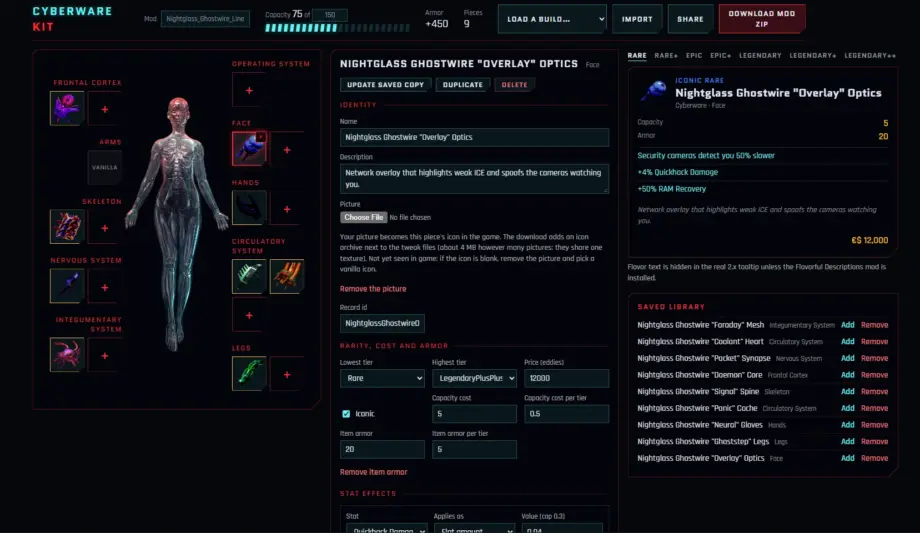
In the Cyberware-Kit editor, you pick a slot on the body map, then set stats, conditions, rarity tiers, abilities and an icon. A live preview shows the item tooltip, and the site builds a mod ZIP once the fields are valid. Built-in effects can be configured without code, and the website itself only needs a browser.
I like the option to shorten the wait between Sandevistan activations when fights come in quick succession.
Version 1.2 added separate Sandevistan settings for seconds added to its duration and a multiplier for its cooldown.
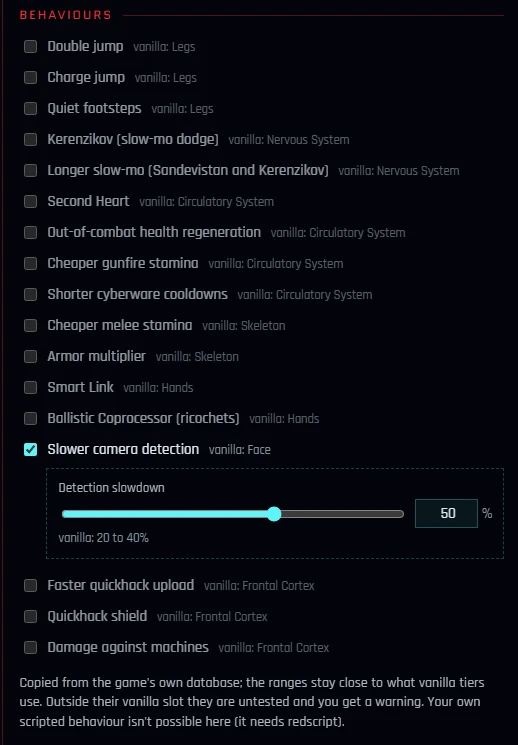
- Version 1.3, released November 25, splits the implant editor into four tabs: identity, stats, behaviours and custom scripts.
- Eye cyberware now offers optical zoom while scanning, from
3xto10x. - Descriptions now appear in the in-game tooltip, and custom cyberdecks show their RAM correctly. Previously exported mods need to be downloaded again for these changes.
You can share a build through a link or short key so another player can open it in the editor. A custom icon image does not travel with the shared settings. That makes it easy to compare implant ideas before installing them. I cover new versions of tools like this in my modding news.
Exported mods require RED4ext, TweakXL and ArchiveXL
On the Cyberware-Kit page on Nexus Mods, the author lists RED4ext, TweakXL and ArchiveXL as requirements for exported mods. redscript and Codeware are needed for scripted effects, while Cyber Engine Tweaks is useful for item-spawning commands. The exported ZIP uses the usual Cyberpunk 2077 mod installation process, either through a mod manager or manually.
The author targets game version 2.5 and calls the editor experimental. Not every effect combination has been tested in game, so backing up a save before installing an exported mod is sensible.